5 Pro Tech Gadgets Worth Considering for Power Users and Tech Enthusiasts
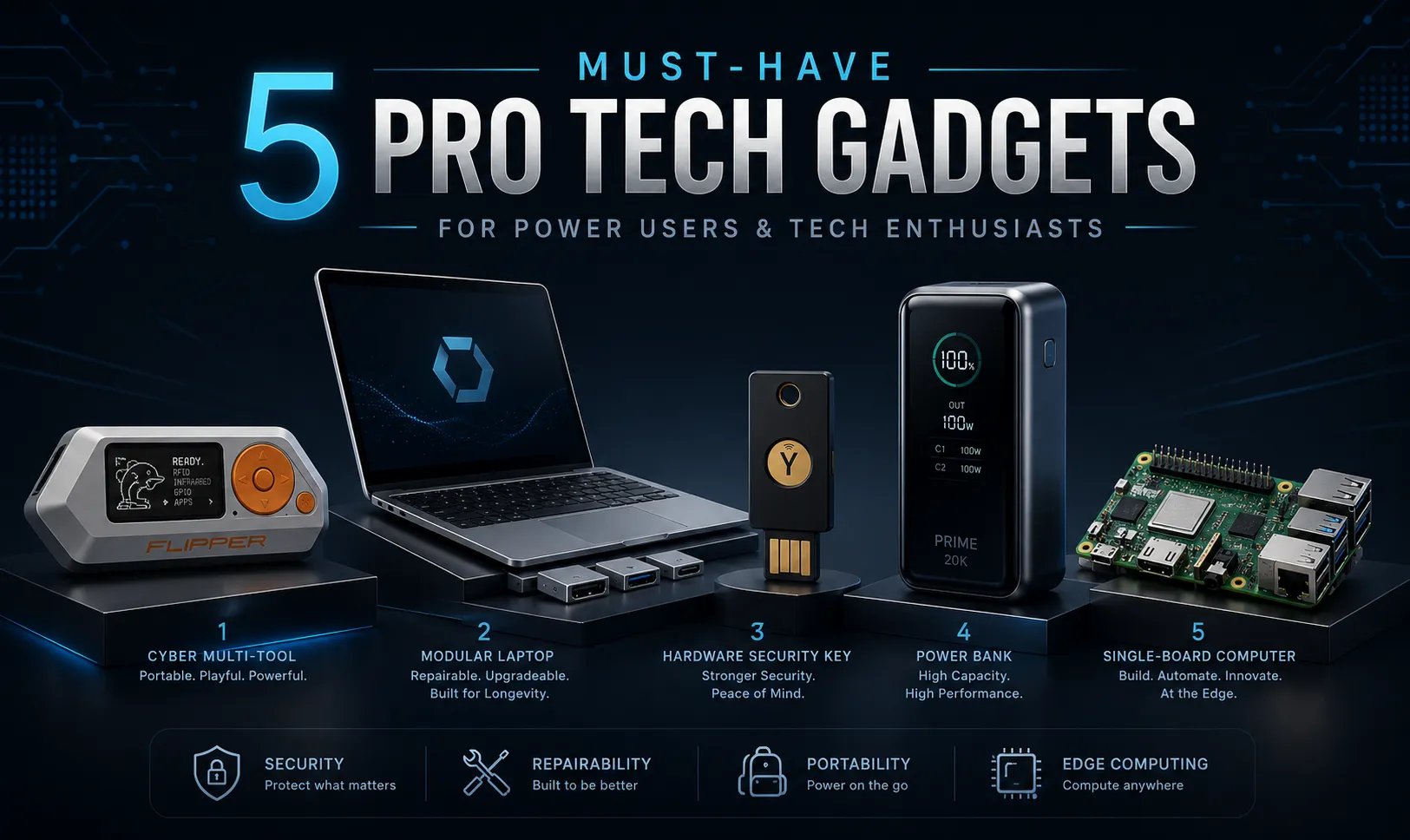
Mainstream consumer technology often focuses on small annual upgrades: a slightly faster processor, a brighter display, or another accessory designed for a single device. Power users usually want something different. Developers, cybersecurity professionals, system administrators, digital creators, and frequent travelers often value hardware that provides greater control, stronger authentication, flexible connectivity, repairability, or the ability to build custom systems. The most useful professional gadgets are not necessarily the most expensive ones. They are devices that solve a specific problem particularly well. In this guide, we examine five standout technology products for security testing, repairable computing, account protection, mobile power, and edge-device experimentation. Responsible-use note: Security and wireless-analysis tools should only be used with systems, devices, and networks that you own or have explicit permission to test. Quick Comparison Product Best for Standout capability Main consideration Flipper Zero Hardware exploration and authorized testing Multiple wireless and hardware interfaces in one portable device Features must be used legally and responsibly Framework Laptop 13 Developers who value repairability Replaceable components and configurable ports Configuration and availability vary by region YubiKey 5 Series Strong account authentication Phishing-resistant FIDO2/WebAuthn authentication A backup key and recovery method are recommended Anker Prime Power Bank 20K Mobile professionals with several devices Up to 200W combined output Heavier than ordinary phone power banks Raspberry Pi 5 Edge computing, home labs, and prototyping Compact Linux computer with GPIO and PCIe Power supply, storage, and cooling may be separate 1. Flipper Zero: A Portable Multi-Tool for Hardware Exploration Flipper Zero is a compact device designed for learning about digital systems, wireless protocols, access technologies, and embedded hardware. Its playful design may resemble a retro electronic toy, but the device combines several interfaces that would otherwise require separate pieces of equipment. Flipper Zero includes Sub-1 GHz radio functionality, 125 kHz RFID, 13.56 MHz NFC, infrared, GPIO connections, and USB functionality. It can also interact with external hardware through protocols such as UART, SPI, and I²C. Key capabilities Sub-1 GHz radio Flipper Zero can receive, inspect, save, and replay certain supported radio signals within its hardware and regional frequency limitations. Potential legitimate uses include: Testing wireless sensors you own Studying remote-control protocols Diagnosing compatible IoT devices Learning how simple radio systems communicate Developing and testing authorized hardware projects Not every radio signal can be decoded or emulated. Modern rolling-code and encrypted systems are specifically designed to prevent simple replay attacks. NFC and RFID The device includes both a 125 kHz RFID module and a 13.56 MHz NFC module. These interfaces can be useful for: Studying supported tag formats Testing access-control prototypes Reading tags you own Developing NFC-based projects Understanding the differences between low- and high-frequency systems Compatibility depends on the tag technology and security implementation. Infrared Flipper Zero can capture and transmit supported infrared commands. This makes it useful for testing: Televisions Air conditioners Projectors Media equipment Custom infrared devices GPIO and hardware debugging The GPIO header allows developers to connect external boards, sensors, and embedded components. Flipper Zero can be used as a portable interface for hardware experimentation, firmware development, and basic protocol debugging. ( Flipper ) Why power users may like it Flipper Zero makes normally invisible signals more interactive. Instead of reading about NFC, infrared, RFID, or serial communication in isolation, users can experiment with supported hardware and observe how those technologies behave. It is most valuable as a learning, debugging, and authorized testing platform—not as a shortcut for accessing systems that belong to someone else. What to consider Wireless regulations vary by country. Hardware support differs between protocols and devices. Some online demonstrations exaggerate what the device can do. Interacting with access systems without permission may be illegal. Community firmware can introduce security, stability, or compliance risks. Best for: Hardware enthusiasts, embedded developers, security students, and authorized penetration testers. 2. Framework Laptop 13: A Repairable and Upgradeable Laptop Many modern laptops prioritize thin construction over long-term maintainability. Memory may be soldered to the mainboard, ports cannot be changed, batteries can be difficult to replace, and a failed component may require replacing an entire assembly. The Framework Laptop 13 takes a different approach. It is designed around replaceable parts, repair documentation, upgradeable storage and memory on supported configurations, and a modular Expansion Card system that allows users to select the ports they need. Current Framework Laptop 13 configurations support interchangeable Expansion Cards, standard M.2 storage, and substantial memory capacity, although exact specifications depend on the selected mainboard generation. ( Framework ) Key capabilities Expansion Card system Instead of permanently fixing every port into the laptop chassis, Framework uses removable Expansion Cards. Available card types can include: USB-C USB-A HDMI DisplayPort Ethernet MicroSD Additional storage This allows users to change their port configuration according to the work they are doing. A developer may choose several USB-C ports on one day and replace one with HDMI or Ethernet for another project. Replaceable components Framework sells many individual components through its marketplace and provides repair guides. Depending on the configuration, users can replace or upgrade components such as: Storage Memory Battery Keyboard Display Webcam module Speakers Expansion Cards Mainboard Replacing the mainboard can provide a processor-generation upgrade without discarding the display, keyboard, chassis, and other reusable parts. Hardware privacy switches Framework laptops include physical privacy controls for the camera and microphones. When disabled, the relevant hardware is electrically disconnected rather than merely blocked through software. The webcam indicator is also hardware controlled. Why power users may like it The Framework Laptop 13 gives technically confident users more control over the computer’s lifespan. It is particularly attractive to people who: Frequently upgrade storage or memory Use Linux Need different port combinations Prefer repairing equipment instead of replacing it Want physical camera and microphone controls Maintain computers for several years What to consider Repairability does not automatically mean every upgrade is inexpensive. New mainboards and replacement components still have costs, and compatibility can vary between generations. Buyers should also confirm the exact processor, memory type, battery, display, and port support of the configuration they are considering. Best for: Developers, Linux users, repairability advocates, and professionals who keep laptops for several years. 3. YubiKey 5 Series: Hardware-Based Account Protection Passwords remain vulnerable to phishing, reuse, credential leaks, and social engineering. Authenticator apps improve security, but users can still be tricked into entering temporary codes on convincing phishing pages. A hardware security key provides another layer of protection. The YubiKey 5 Series supports protocols including FIDO2/WebAuthn, U2F, OTP, Smart Card/PIV, and OpenPGP. Models are available with combinations of USB-A, USB-C, NFC, and Lightning connectivity. The devices require no batteries and selected models are IP68-rated and crush resistant. ( Yubico ) Key capabilities FIDO2 and WebAuthn FIDO2 authentication uses public-key cryptography tied to the legitimate website or service. When correctly implemented, this provides strong resistance to ordinary credential-phishing attacks because the hardware key will not authenticate a fraudulent domain in the same way it authenticates the genuine one. This is more accurate than calling a security key “unhackable.” No device or account system should be described as completely immune to attack. Multiple security protocols The YubiKey 5 Series can support both modern and legacy authentication environments. Depending on the service and configuration, it can be used for: Passwordless sign-in Two-factor authentication Smart-card authentication OpenPGP operations One-time passwords Computer and network access Developer and administrator accounts Not every website supports every protocol, so compatibility should be checked before choosing a model. No battery required The key receives power through USB or NFC interaction. There is no battery to charge, and the device can be carried on a keychain or stored securely as a backup credential. Why power users may like it A hardware key is especially useful for protecting high-value accounts such as: Primary email Password managers Cloud infrastructure Source-code repositories Domain registrars Administrative dashboards Financial platforms Business identity systems It creates a physical requirement for authentication that is difficult to reproduce through password theft alone. What to consider Do not rely on one security key without a recovery plan. A safer setup may include: One primary key carried by the user One backup key stored securely Recovery codes kept in a separate protected location Alternative recovery methods reviewed before an emergency Users should also purchase through trusted sellers and verify that the model supports their devices and services. Best for: Developers, administrators, journalists, business owners, cryptocurrency users, and anyone protecting high-value accounts. 4. Anker Prime Power Bank 20K: High-Output Power for Mobile Work A small phone power bank is often insufficient for professionals carrying laptops, tablets, phones, cameras, and development hardware. The Anker Prime Power Bank with a 20,000mAh capacity is designed for higher-power devices. The 200W model includes two USB-C ports and one USB-A port. It supports up to 200W combined output, with each USB-C port capable of delivering up to 100W under supported conditions. Anker states that the device can recharge in approximately 75 minutes using a suitable 100W power source. ( Anker ) Key capabilities Up to 200W combined output The two USB-C ports can supply high-power devices such as compatible laptops, tablets, handheld gaming systems, and phones. This can be useful when charging two laptops or a laptop and another high-demand device at the same time. Actual charging speed depends on: The connected device USB Power Delivery support Cable rating Battery temperature Remaining battery level How power is divided between ports Real-time display The integrated screen can display information such as: Input power Output power Remaining battery percentage Estimated charging or recharging time This is more useful than a simple four-light battery indicator when diagnosing cables, chargers, or device power behavior. Fast recharging A high-input power bank can be replenished much faster than conventional models, provided that a compatible high-wattage charger and cable are used. Why power users may like it The power bank is useful for: Long flights Conferences Remote work Field testing Photography Portable development systems Handheld gaming devices Working in locations with limited outlets It can reduce the need to carry separate low-capacity batteries for each device. What to consider At approximately 545 grams, it is considerably heavier than a basic phone power bank. ( 安克服务支持 ) Users should also verify airline battery rules before traveling and carry power banks in cabin baggage rather than checked luggage where required. A 200W total rating does not mean every connected device will always receive its maximum charging speed. Best for: Digital nomads, photographers, developers, frequent travelers, and users carrying USB-C laptops. 5. Raspberry Pi 5: A Compact Platform for Edge Computing and Home Labs Raspberry Pi 5 is a compact single-board computer that can run a full Linux operating system while also connecting directly to sensors, displays, cameras, storage, and custom electronics. It includes a 2.4 GHz quad-core 64-bit Arm Cortex-A76 processor, VideoCore VII graphics, dual 4Kp60 display output, USB 3, Gigabit Ethernet, Wi-Fi, Bluetooth, a 40-pin GPIO header, and a PCIe 2.0 x1 interface. Memory configurations are available up to 16GB. ( Raspberry Pi ) Key capabilities General-purpose Linux computing Raspberry Pi 5 can function as: A lightweight desktop computer A Linux development environment A small server A network-monitoring system A home-automation controller A media system A programming-learning platform It provides considerably more flexibility than a single-purpose smart-home hub. GPIO hardware interface The 40-pin header allows the Pi to interact with: Sensors Relays Displays Motors Buttons LEDs Environmental monitors Custom circuit boards This makes it useful for projects that combine software with physical hardware. PCIe expansion Raspberry Pi 5 includes a PCIe 2.0 x1 interface. With an appropriate adapter, users can connect compatible peripherals such as M.2 storage. This can provide faster booting and storage performance than a basic microSD card setup. ( Raspberry Pi ) Dual-display and media capabilities The board supports two 4K displays at up to 60 frames per second, as well as hardware HEVC decoding. This makes it more capable as a desktop, information display, or media-oriented system than earlier generations. Projects power users can build Potential projects include: A Pi-hole DNS filtering server A Home Assistant controller A development or staging server A local Git server A network status dashboard A small Kubernetes learning cluster A camera or environmental monitoring system A local file server An edge-AI prototype A portable security lab Why power users may like it Raspberry Pi 5 is not a finished appliance with one fixed purpose. It is a platform that can be reconfigured repeatedly. The same board can begin as a development server, later become a home-automation controller, and eventually be used in a custom embedded project. What to consider The board may require additional purchases, including: A suitable USB-C power supply Storage A case An HDMI cable Active cooling A keyboard, mouse, or display PCIe adapters for certain expansions Raspberry Pi recommends a high-quality 5V/5A USB-C supply and notes that the Pi 5 performs best with active cooling under heavier workloads. ( Raspberry Pi ) Best for: Developers, students, home-lab builders, embedded-system enthusiasts, and edge-computing experimenters. Which Gadget Is Right for You? Choose Flipper Zero when: You want to study wireless and embedded protocols. You work with hardware security or IoT systems. You need a portable GPIO and signal-exploration device. You understand the legal boundaries of security testing. Choose Framework Laptop 13 when: You want a laptop that can be repaired and upgraded. You value replaceable storage, memory, and components. You frequently change the ports you need. You want physical camera and microphone controls. Choose YubiKey 5 when: You protect important personal or professional accounts. You want phishing-resistant authentication. You manage cloud infrastructure or administrator access. Your most important services support hardware security keys. Choose the Anker Prime 20K when: You travel with a USB-C laptop. You frequently charge several devices. You need detailed charging information. Portability matters, but maximum lightness is not essential. Choose Raspberry Pi 5 when: You want to build custom software and hardware projects. You operate a home lab. You are learning Linux, networking, or embedded development. You need a compact edge-computing platform. Professional Hardware vs Ordinary Consumer Accessories Area Typical consumer accessory Professional or enthusiast hardware Purpose Broad convenience Solves a specific technical problem Configuration Mostly fixed Often configurable or programmable Repairability Varies, often limited May prioritize replaceable components Security Passwords or app-based authentication Can include hardware-backed authentication Connectivity Basic consumer ports Specialized radio, GPIO, PCIe, or high-power USB-C Documentation Short consumer manual May include technical specifications and developer resources Learning curve Low Moderate to high Best user General consumer Developer, administrator, creator, or enthusiast Professional equipment is not automatically better for everyone. A technically advanced device may be more expensive, heavier, or more complicated than a simpler consumer alternative. The right choice depends on whether its specialized features solve a problem you actually have. Connecting Professional Hardware with Browser-Based Utilities Professional hardware frequently produces information that must be inspected, converted, or validated. Examples include: JSON configuration files Network addresses Encoded values Device logs Checksums Cron expressions Images and screenshots QR codes Structured API responses ToolOnline.ink provides browser-based utilities for common file, image, code, and data tasks without requiring a separate application for every operation. For tools explicitly described as client-side, supported processing is intended to occur in the browser. Users should still review the privacy explanation for each individual tool before entering sensitive IP addresses, credentials, configuration files, or production data. Never paste real API keys, passwords, access tokens, or private encryption keys into a general-purpose online utility. Replace sensitive values with test placeholders whenever possible. Frequently Asked Questions Is Flipper Zero legal to own? Ownership rules vary by country, but the more important issue is how the device is used. Testing your own hardware or systems with explicit authorization is fundamentally different from interacting with devices, access cards, or networks belonging to someone else. Always follow local radio regulations, computer-misuse laws, and access-control laws. Can Flipper Zero open any garage door or access system? No. Many modern systems use encryption, rolling codes, secure credentials, or protocols that cannot be bypassed through simple signal replay. Claims that the device can universally open doors, cars, or access systems are misleading. Is a YubiKey completely unhackable? No security product is completely unhackable. A YubiKey can provide strong phishing resistance and hardware-backed authentication, particularly when used with FIDO2/WebAuthn. It does not protect against every possible threat, such as a compromised authenticated session, unsafe recovery procedures, or malware already controlling a device. Why is a hardware key better than SMS authentication? SMS codes may be vulnerable to SIM-swapping, account-recovery attacks, and real-time phishing. FIDO2/WebAuthn security keys use cryptographic authentication associated with the legitimate service, which provides stronger phishing resistance than manually entered SMS codes. Should I buy two hardware security keys? Using a backup key is strongly recommended for important accounts. Register both keys while you still have access, then store the backup in a separate secure location. Can the Framework Laptop really be upgraded indefinitely? No laptop can be guaranteed unlimited future upgrades. Framework’s modular design allows many parts to be replaced and provides a path for certain mainboard upgrades, but future compatibility, component availability, and pricing cannot be guaranteed indefinitely. Can the Anker Prime power bank charge every laptop? It can charge many USB-C laptops, but compatibility and speed depend on the laptop’s power requirements and charging protocol. High-performance workstations requiring more than 100W from one port may charge slowly, maintain their battery level, or fail to charge under heavy load. Can Raspberry Pi 5 replace a desktop computer? It can handle many desktop, development, server, and educational tasks. It may not replace a powerful workstation for demanding video production, large software builds, high-end gaming, or workloads that require x86-specific applications. Conclusion The best technology gadgets are not defined by flashy marketing or the number of features printed on the box. They are valuable because they give users more control. Flipper Zero makes wireless and embedded technologies easier to explore. Framework Laptop 13 gives owners greater control over repair and upgrades. YubiKey 5 adds a physical security layer to important accounts. The Anker Prime Power Bank supports demanding mobile workflows, while Raspberry Pi 5 provides a flexible platform for building custom systems. Before buying any professional gadget, ask three questions: What specific problem will it solve? Will its advanced features fit my actual workflow? Am I prepared for the additional setup, responsibility, or learning curve? A specialized device is worthwhile when it removes a genuine limitation—not simply because it looks impressive. Choose tools that expand what you can securely build, repair, protect, and control.

Swoopa★ 3.850K downloadsAuto & Vehicles
1Be FIRST to every good deal with instant Facebook Marketplace Notifications! Swoopa scans all your local classifieds and sends marketplace alerts the second an item is posted.
Scale your flipping business with Swoopa’s best in class sourcing technology. Swoopa’s instant refresh rates will ensure you will always be the first to message when a great deal is posted.
Start a FREE 48 hour trial now and start dominating with Swoopa's ultra fast marketplace notifications.
Why Swoopa?
- Source from ALL your local buy swap sell marketplaces in one app.
- Instant unmatchable search speeds we know every second counts
- Perfect for all flippers, from established car dealerships to side hustles
- Advanced Ai powered iPhone flipping search filters!
- Save 20 hours a week and stop scrolling
- Double your revenue by getting every good deal in your market.
- Search for anything from cars to couches and dressers, the best flippers all use Swoopa.
- Advanced Ai filtering
Try the app for 48 hours for free now! You’ll be prompted to choose a subscription when your trial ends so you can keep dominating the market with Swoopa.
Tasker★ 4.339.1K downloadsSocial
2⚙No repetitive tasks for you, let your Android device handle it!⚙ Total Automation, From Settings to SMS. Here are only some of the things you could do with Tasker. ☑ Automations Make your phone a true smart phone! Why remember to change the volume every day when you leave home when your phone can do it for you? ☑ Actions 350+ actions allow you to truly customize your phone like never before! Send SMS, create notifications, change almost any system setting like Wifi Tether, Dark Mode, Always On Display, change any volume, control Do Not Disturb, open apps, file manipulation, control music playback, get your location... you get the idea. If you can think of it, Tasker can probably do it for you! Note: root is NOT (I repeat NOT) required for majority of the functions. However, a few of the actions (like the Kill App and Mobile Data action on some devices) require root. This is because of Android security policies that developers cannot work around. ☑ Automatic File Backups If you set it up to do so, Tasker can automatically backup your files to a specific folder on the device, SD card, USB key or even Google Drive! This is useful if you want to keep your files safe even if you lose your phone. ☑ Download and Install APKs directly By your request (if you set up a task to do so), Tasker can automatically check a website for updated APKs, receive those APKs from said websites and initiate installation of any files! ☑ Other Triggers Manually trigger your actions via launcher shortcuts, quick setting tiles, widgets, long-pressing volume buttons, media buttons (like the ones on your BT headsets or headphones), Bixby button, Navigation Bar, Notifications and more! ☑ Join - Remote Tasker Adding Join to the mix will even allow you to trigger tasks from another Android device or PC! ☑ Scenes Design your own UI and use it to display any info you want or trigger any task! ☑ App Creation ☑ Developer Friendly Many 3rd party developers already allow you to perform actions in their apps and listen to their events/states through Tasker! ☑ 7 day trial - one time payment to unlock It's not possible to fix problems reported via Play Store Comments so please use the "Report Issue To Developer" option in the app > Menu to do so. Note 1: Tasker uses the BIND_DEVICE_ADMIN permission in order to provide the System Lock functionality Note 2: Tasker uses an accessibility service for some of its features like closing the notification tray, checking which app is currently opened and more.
ProShot★ 4.022.8K downloadsPhotography
3NEW: Try ProShot Evaluator first to see which features your device supportshttps://play.google.com/store/apps/details?id=com.riseupgames.proshotevaluator"The screen layouts are excellent. DSLRs could learn a thing or two from the design of ProShot"-Engadget"If you can name it, chances are ProShot has it"-GizmodoWelcome to ProShot, your complete photography and film making solution on Android.Whether you are a seasoned professional or just getting started, ProShot has something for you. Its expansive feature set and unique interface unlock unlimited possibilities, ensuring you’ll never miss that perfect shot.Manual ControlsProShot unleashes the full power of the camera2 API to offer a range of manual, semi-manual and automatic controls, just like a DSLR. Take full advantage in Manual mode, keep ISO in check in Program mode, or leave it all on Auto and simply enjoy the moment.Endless FeaturesWith its wide range of options, ProShot adjusts to your changing world. Fly through camera settings with its unique Dual Dial system. Record video from any mode with the press of a button. Play with light in unique Light Painting modes. Capture the stars with Bulb mode. And adjust camera output with options for Noise Reduction, Tone Mapping, Sharpness and much more.Privacy Built-InIn a world where everyone wants to harvest your data, ProShot doesn’t, because that’s the way it should be. No personal data is stored, collected or transmitted, so you can rest assured that your images, videos and data are safe.There is so much more to ProShot. Below is a list of many of the features waiting for you. ProShot is under constant development, so great new things are always just on the horizon!• Auto, Program, Manual, and two Custom modes, just like a DSLR• Shutter priority, ISO priority, Automatic, and Full Manual control• Adjust exposure, flash, focus, ISO, shutter speed, white balance and more• Shoot in RAW (DNG), JPEG or RAW+JPEG• HEIC support on compatible devices• Support for Vendor Extensions including Bokeh, HDR and more• Light Painting with special modes for capturing water and star trails• Bulb mode integrated into Light Painting• Timelapse (intervalometer and video), with full camera control• 4:3, 16:9, and 1:1 standard aspect ratio for photo• Custom aspect ratios (21:9, 5:4, anything is possible)• Zero-lag bracket exposure up to ±3• Manual focus assist and focus peaking with customizable color• Histogram with 3 modes• Zoom up to 10X using just one finger• Customizable accent color to fit your style• Camera roll seamlessly integrated into the viewfinder• Adjust JPEG quality, Noise Reduction quality, and storage location• Shortcuts for GPS, screen brightness, camera shutter, and more• Customization panel to truly make ProShot your own. Customize startup mode, remap volume buttons, set filename format, and much moreVideo Features• All camera controls available in Photo mode are also available in Video mode• Up to 8K video with extreme bitrate options• Support for “beyond 4K” on compatible devices• Adjustable frame rate from 24 FPS up to 240 FPS• LOG and FLAT color profiles for increased dynamic range• Support for H.264 and H.265• Up to 4K Timelapse• Industry-standard options for 180 degree rule• Support for external microphones• Monitor audio levels and video file size in real-time• Pause / resume recording• Support for simultaneous audio playback (like Spotify) while recording• Video lightTime to leave the heavy DSLR at home, ProShot's got your back.
 4
I've made this app for real old school photographers or advanced amateurs shooting analog photography. For the price of a soda you will support hundreds of hours of work.LightMeter's reflected light meter only works with devices that are able to save exposure to exif. Incident light meter usually works on any device but...Be advised that the precission and quality of this and all phone light meters is limited by the device itself. I recommend using the reflected light option, the precission can be really good. Features:-ISO range from 3 to 6400.-Incident light metering (needs light sensor)-Reflected light metering (needs camera, only a few are compatible)-Low light alert.-Camera can be muted. (not in all countries)-Exif and sensor info displayed on screen as an option.-Calibration.-Vibration on measure/hold.-Incident light reading can be held.-Alternative ISO selector.-State and ISO recall on resume.-Spot measure if camera has zoom.-Support for all screens, including extra high resolution.Thanks for your supportIf you need help email me at davidquiles@me.com (Spanish and English)